The Dinie API uses OAuth2 Client Credentials for authentication. You exchange your API credentials for a short-lived access token and include that token in all requests.
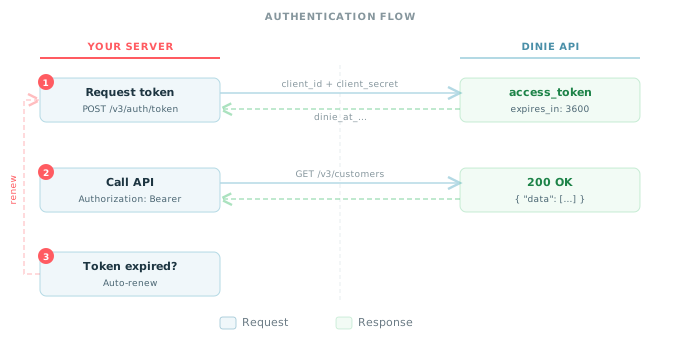
- Your server sends credentials to
POST /v3/auth/token - Dinie returns a short-lived JWT access token
- Include the token as a Bearer header in all subsequent requests
Send a POST request with your client_id and client_secret via HTTP Basic Authentication:
import Dinie from "dinie";

// The SDK exchanges credentials and caches the token automatically.
const dinie = new Dinie({
  clientId: process.env.DINIE_CLIENT_ID,
  clientSecret: process.env.DINIE_CLIENT_SECRET,
  environment: "sandbox",
});{
"access_token": "dinie_at_...",
"token_type": "bearer",
"expires_in": 3600
}| Field | Description |
|---|---|
access_token | JWT token prefixed with dinie_at_. Use as a Bearer token. |
token_type | Always bearer. |
expires_in | Token lifetime in seconds (3600 = 1 hour). |
Include the token in the Authorization header of each API request:
Authorization: Bearer dinie_at_...Warning: Never include credentials or tokens in URLs or query parameters. Always use the
Authorizationheader.
Tokens expire after 1 hour (3600 seconds). When a token expires, the API returns a 401 error:
{
  "type": "https://api.dinie.com.br/errors/authentication-failed",
  "title": "Authentication Failed",
  "status": 401,
  "detail": "Bearer token has expired.",
  "code": "token_expired"
}
To handle expiration:
- Proactive renewal -- track the
expires_inand request a new token before it expires (e.g., at 80% of TTL) - Reactive renewal -- catch
401responses with thetoken_expiredcode, request a new token, and resend the request
Tip: The SDKs manage token renewal automatically. They request a new token before the current one expires and transparently resend failed requests.
When you initialize the SDK with your credentials, it manages the entire token lifecycle:
- Exchanges credentials for a token on the first API call
- Caches the token in memory
- Renews the token before expiration
- Resends requests that failed due to expired tokens
You never need to call the token endpoint directly when using an SDK.
| Status | Code | Description |
|---|---|---|
| 400 | missing_grant_type | Missing grant_type parameter |
| 400 | unsupported_grant_type | grant_type is not client_credentials |
| 400 | missing_authorization | Missing Authorization header |
| 401 | invalid_client | client_id does not exist |
| 401 | invalid_client_secret | client_secret does not match |
| 401 | credential_revoked | Credential has been revoked |
| 401 | credential_expired | Credential is past its expiration date |
- Store secrets securely -- use environment variables or a secret manager. Never commit credentials to version control.
- Use server-side calls only -- never expose your
client_secretin frontend code, mobile apps, or client-side JavaScript. - Rotate credentials regularly -- create a new credential, update your integration, then revoke the old one. See the Credential Management section below.
- Separate credentials by environment -- use different credentials for sandbox and production.
- Monitor usage -- check the
last_used_atfield on your credentials to detect unauthorized use.
Partners can have multiple active API credentials simultaneously. This enables credential rotation without downtime -- create a new credential, update your integration, then revoke the old one.
Create a new API key with a human-readable name and an optional expiration date.
const credential = await dinie.auth.credentials.create({
  name: "Production Key",
  expires_at: "2027-03-04T00:00:00Z",
});

// Store credential.client_secret securely -- it is shown only once.
console.log(credential.client_id);
console.log(credential.client_secret);{
"id": "dinie_ci_550e8400e29b41d4a716446655440000",
"client_id": "dinie_ci_550e8400e29b41d4a716446655440000",
"client_secret": "dinie_cs_live_xxxxxxxxxxxxxxxxxxxxxxxxxxxxxxxx",
"name": "Production Key",
"status": "active",
"expires_at": "2027-03-04T00:00:00Z",
"created_at": "2026-03-04T10:00:00Z",
"updated_at": "2026-03-04T10:00:00Z"
}Warning: The
client_secretis returned only once at creation time. Store it immediately in your secret manager. It cannot be retrieved again.
| Field | Required | Description |
|---|---|---|
name | Yes | Human-readable label for this key (e.g., "Production Key", "Staging Key") |
expires_at | No | Optional expiration date (ISO 8601). null means the credential never expires. |
Retrieve all credentials for your account. Secrets are never included in list responses.
const credentials = await dinie.auth.credentials.list();

for (const cred of credentials.data) {
  console.log(cred.name, cred.status, cred.last_used_at);
}{
"data": [
{
"id": "dinie_ci_550e8400e29b41d4a716446655440000",
"client_id": "dinie_ci_550e8400e29b41d4a716446655440000",
"name": "Production Key",
"status": "active",
"expires_at": "2027-03-04T00:00:00Z",
"created_at": "2026-03-01T10:00:00Z",
"last_used_at": "2026-03-04T09:30:00Z"
}
],
"has_more": false
}Revoke a credential by client_id. Revocation takes effect immediately -- no new tokens can be issued with this credential. Already-issued tokens continue working until they expire (up to 1 hour).
await dinie.auth.credentials.del("dinie_ci_550e8400e29b41d4a716446655440000");The response is 204 No Content with an empty body.
Info: You cannot revoke your last active credential. A partner must always have at least one active credential. Attempting to revoke the last one returns a
409 Conflictwith codelast_active_credential.
Follow this process for zero-downtime credential rotation:
- Create a new credential with
POST /v3/auth/credentials - Update your integration to use the new
client_idandclient_secret - Verify the new credential works by requesting a token with
POST /v3/auth/token - Revoke the old credential with
DELETE /v3/auth/credentials/{old_client_id}
During steps 1--4, all active credentials work simultaneously. There is no authentication downtime.
Tip: Set an
expires_aton credentials as a safety net. Even if you forget to revoke an old credential, it will stop working after the expiration date.
| Environment | Rotation Frequency |
|---|---|
| Production | Every 90 days |
| Staging | Every 30 days or on demand |
Monitor the last_used_at field to detect credentials that are no longer in use and should be revoked.